News Item

forenzo.io is live: from the interview room to the prosecutor without a disc

The interview ends at 3:40 in the afternoon. Then somebody burns a disc. Somebody fills out a chain of custody form by hand. The detective needs a copy, the prosecutor needs one in September, and by then nobody is certain which copy is the original.

forenzo.io is live. It is a new Network Ninja product, and it connects to Collaborate, the case management system already running in hundreds of Children’s Advocacy Centers. $29 per interview, $19 with your Collaborate code, and the first three are free.

How it works

Upload the recording. A 90 minute interview is usually back in about fifteen.

  1. Upload. The whole file is fingerprinted on the way in.
  2. Transcribe. Speakers separated, up to five: an interviewer, a child, an interpreter, an advocate.
  3. Index. Key disclosures, topics and follow-up flags, each with a timestamp.
  4. Share. One PIN-protected link per recipient. Nothing to install.
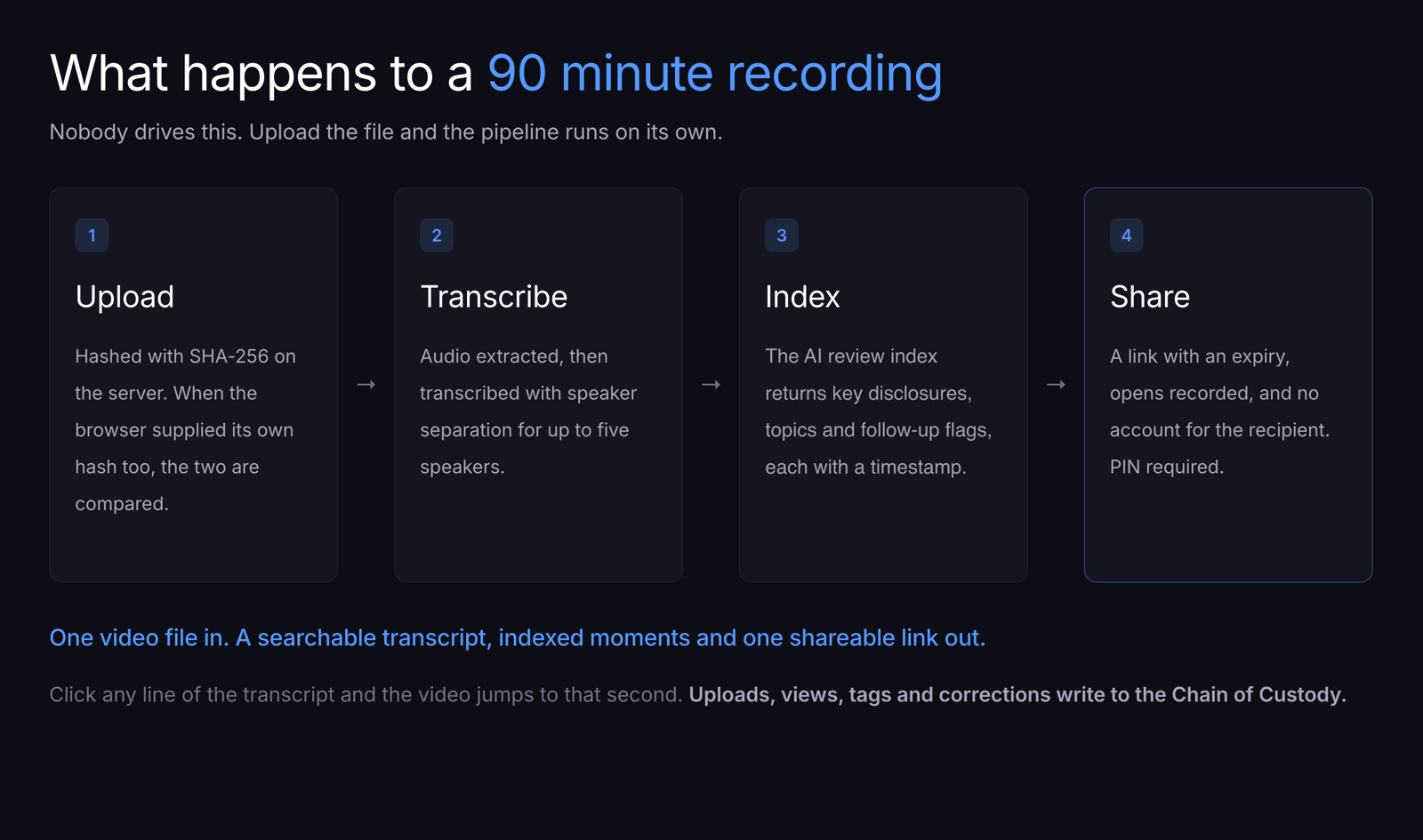
The four stages of the forenzo.io pipeline: upload, hashed with SHA-256 on the server and compared against the browser's own hash; transcribe, with speaker separation for up to five speakers; index, an AI review index returning timestamped key disclosures, topics and follow-up flags; and share, a link with an expiry, opens recorded, no account for the recipient, and a required PIN.

It opens in about a second

Click the recording and it plays. No progress bar, no waiting for a multi-gigabyte file to come down. It streams, so the first frame is there in about a second whether the interview runs twenty minutes or two hours.

Seeking works the same way. Click any line of the transcript and the video is at that second. Not loading toward it. At it. A reviewer who needs the four minutes that matter watches four minutes, and court prep stops being an afternoon of scrubbing with a legal pad.
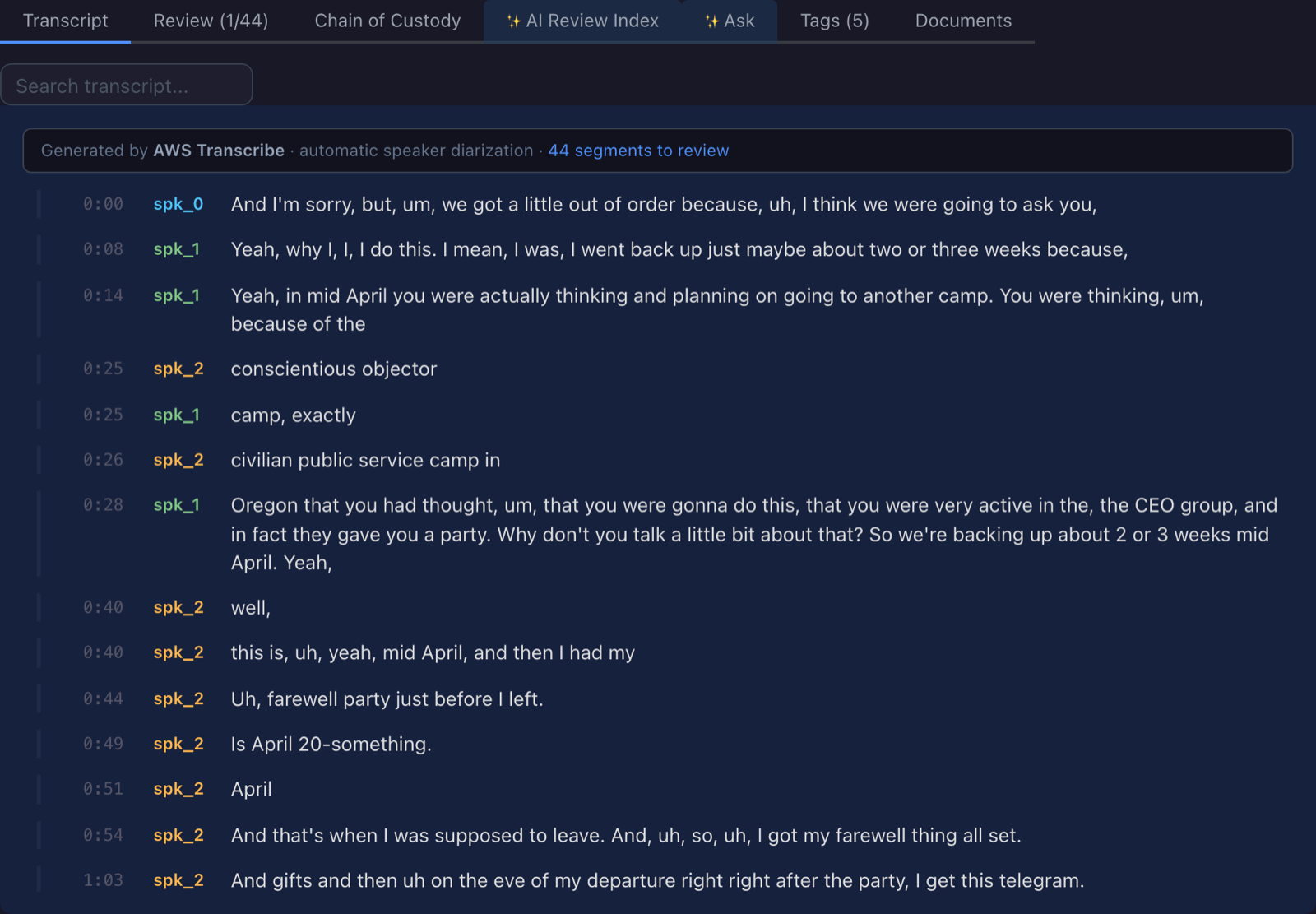
The Transcript tab of a recording in forenzo.io, showing timestamped lines from 0:00 onward, each labeled with a color-coded speaker, alongside a Search transcript box and tabs for Review, Chain of Custody, AI Review Index, Tags and Documents.

Your detective never creates a login

Neither does your prosecutor, and neither does a reviewer at another center. Every link carries a PIN and an expiry. Set the PIN or let forenzo.io generate one, and send it separately from the link so the two never travel together. Opens are recorded in the access log, which you can read and they cannot. Revoke it and it stops working. What they watch is their own copy, with their name and email, the case number and CONFIDENTIAL burned into the frame rather than drawn over the player. A copy that walks out says who it was made for.

That covers peer review and case review too. Instead of mailing a DVD to a reviewer at another center, you send a link that expires.
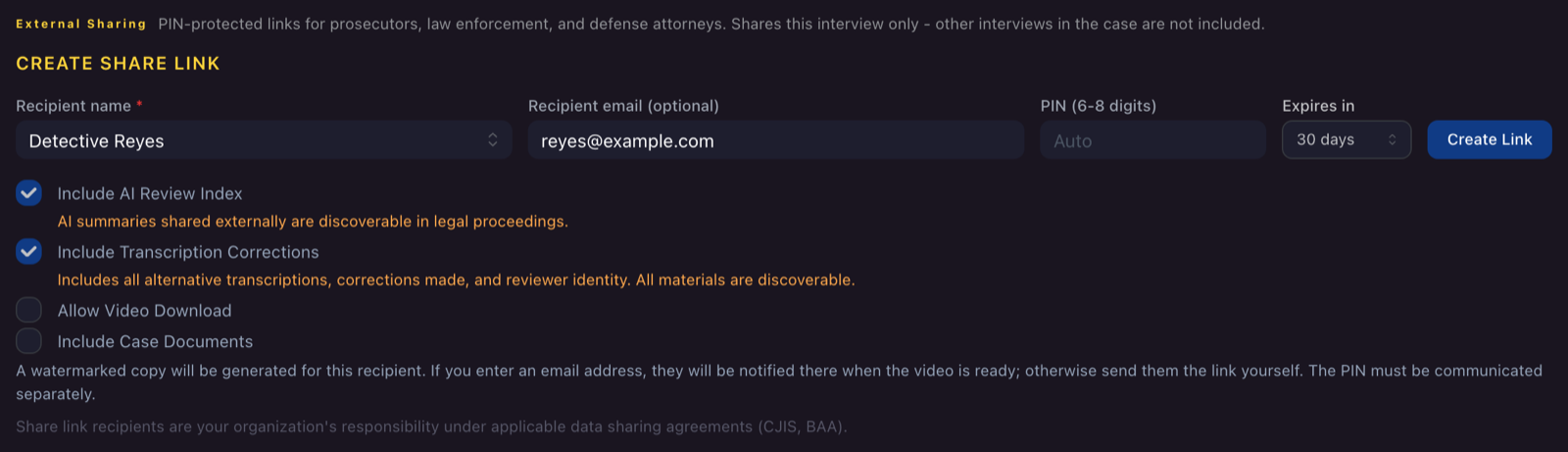
The Create Share Link form in forenzo.io, with fields for recipient name, optional email, a 6 to 8 digit PIN, and an expiry of 30 days, plus separate choices to include the AI review index, transcription corrections, video download and case documents.

You start in the case, not in forenzo.io

If your center is on Collaborate, one action from the case hands you off, and the recording comes back attached to that case. You sign in through Collaborate. No second login, no retyped case number.

An API anyone can build against

That handoff is not the only way in. forenzo.io has a documented machine-ingest API, and any recorder or case management system can build against it. It is how a center running something other than Collaborate connects what it already has. Nobody carries a file anywhere.

  • Your system authenticates with a key issued to your center and hands the recording over tagged with your own case number, so it lands in the right case with the child already attached
  • Store your own identifier on it and the record is findable from either side
  • It uploads in parallel parts, each hashed on the way, so a part that drops on a bad connection retries itself instead of restarting the file
  • The server rehashes the whole stored file, not the parts, and a mismatch cancels processing rather than quietly moving a bad file downstream
  • Machine uploads land in the same audit log your team’s clicks do

Ask us for the guide and we will turn the API on for your organization.

Catching what the machine mishears

Transcription runs on AWS Transcribe. On a child speaking at the edge of audible, any engine writes down a guess. What separates platforms is what happens next.

Click a segment and you get every reading the engine considered, with its confidence. Below, it offers four and every one is wrong. That is what Write-in is for, and why a person who knows the vocabulary does the review. Your correction is stored beside the original, never over it.
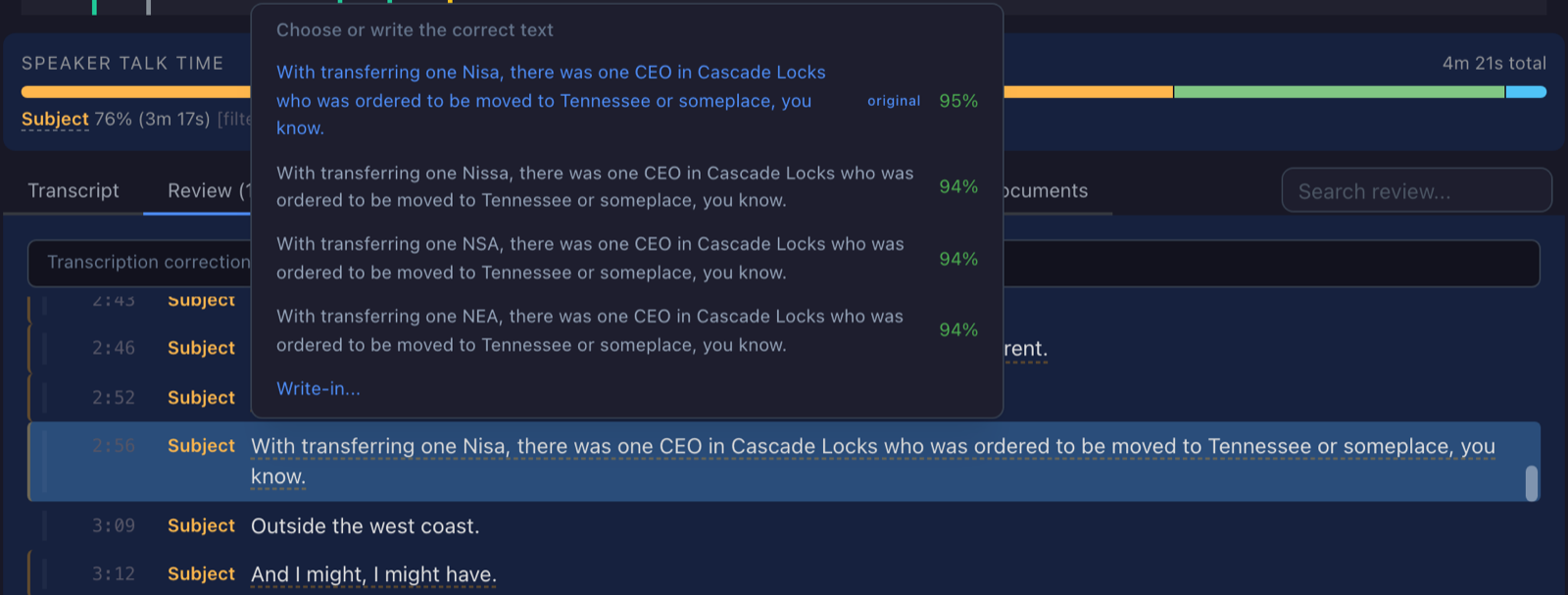
The alternatives menu open on a transcript segment in forenzo.io, headed "Choose or write the correct text." Four readings of the same sentence are listed, differing in one word: Nisa marked original at 95 percent, then Nissa, NSA and NEA at 94 percent each, with a Write-in option below them.

What it leaves behind

A SHA-256 hash at upload, and an access log that records views, tags, corrections and speaker renames, with the person and the timestamp to the second on every row. Nothing in it can be changed afterward, including by us: the database rejects any attempt to update or delete a row. Ask it to re-verify years later, before you rely on that file in a proceeding, and it re-reads the stored file and re-attests.
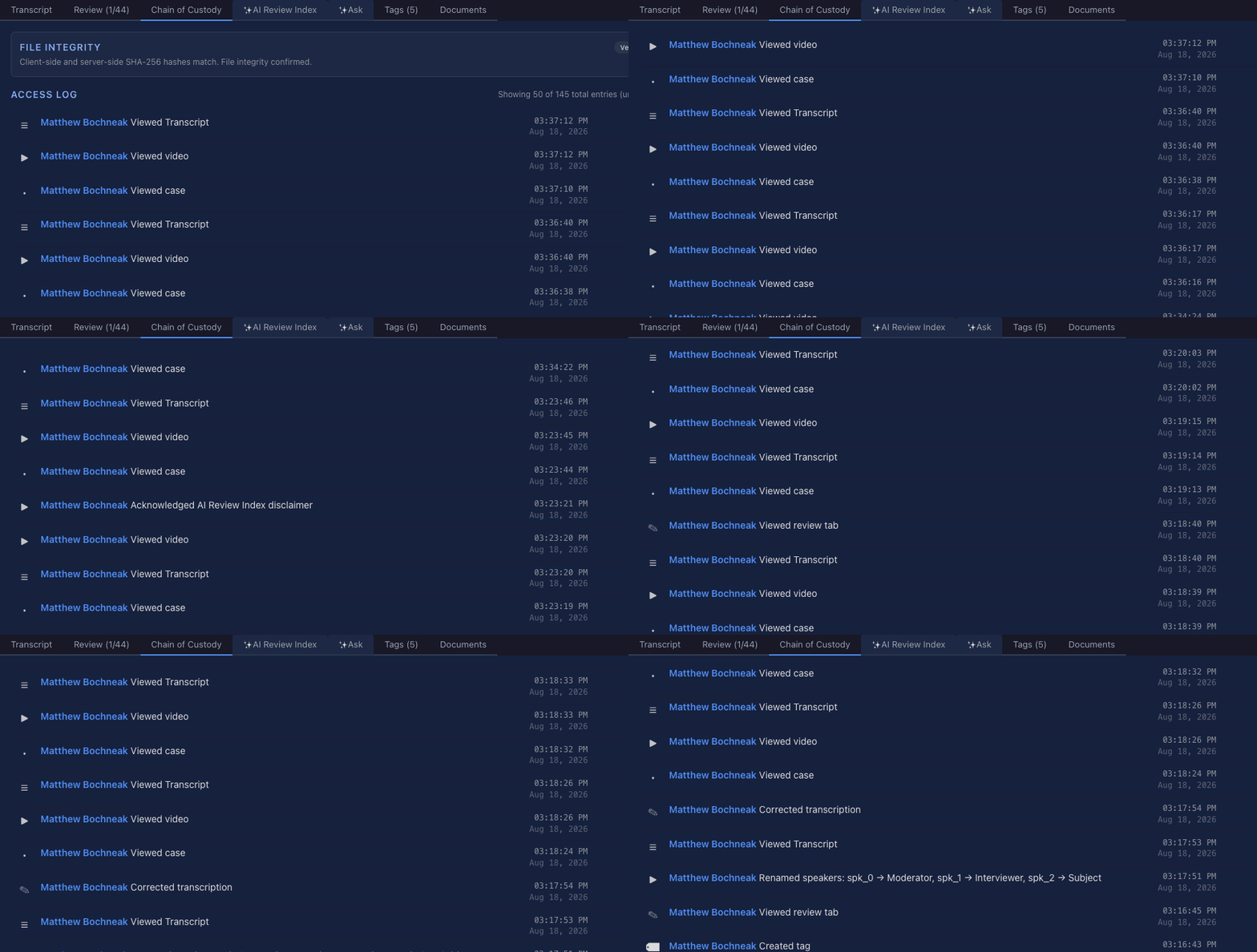
An animated scroll through the Access Log of a recording in forenzo.io, headed "Showing 50 of 145 total entries," with each view, acknowledgment, correction, speaker rename and tag creation on its own row with a timestamp to the second.

If you ever leave, you take all of it: every case, recording, transcript, correction and audit entry in one export, each file hashed, with a root hash over the bundle so whoever receives it can confirm nothing was altered without contacting us.

CJIS Security Policy v6.0, mapped control by control, and we send the whole matrix rather than a summary. The HIPAA Business Associate Agreement is signable in the product. Network Ninja is SOC 2 certified at the company level and Collaborate at the product level, both by third-party audit.

The first three interviews are free at forenzo.io. Contact us for a demo if your center pays by check, or your state chapter is buying for its members.
Stay up to date with Collaborate by signing up for our newsletter.

Subscribe Now

Your Cases, Your Clients, Your Workflow

Collaborate software running on a MacBook, iPad, and iPhone.

Collaborate is customizable case management software for non-profits and social services agencies.

  • Track Case information, from Intake, providing Services, setting Goals, to recording Outcomes.
  • Efficiently access Case history, medical exams, test results, custom Reports, and more.
  • Tap a single, secure, HIPAA-compliant, easy-to-use, web-based platform for all your Case management needs.

Who's Using Collaborate

Children’s Advocacy Centers of Georgia

Member of the National Children’s Alliance, The Children’s Advocacy Centers of Georgia, Inc. is Georgia’s statewide membership association of 50 local children’s advocacy centers.

CACGA Client Story

  • Dozens of networked Children's Advocacy Centers (CACs), each with own private customizable instance
  • CACs able to search through entire state database of clients, caregivers, and offenders
  • Statewide reporting
  • Mix of Multi-Disciplinary Teams (MDTs) and non-MDT children’s advocacy centers
  • 500+ users, years of case data, tens of thousands of cases, hundreds of thousands of services

South Carolina Coalition Against Domestic Violence and Sexual Assault

SCCADVASA is the statewide partnership of organizations providing services to victims and survivors of domestic violence and sexual assault in South Carolina.

Members include rape crisis centers and women's shelters throughout the state, serving clients 24 hours a day, 7 days a week.

  • Dozens of member organizations, many cross-trained with partner CACs
  • Cross-trained Users can quickly switch between DV/SA and CAC sides
  • Hotline Intakes, with ability to easily change Case type for full Intakes later
  • Optional Modules include Batch Simple Services, Document Queue, and Document Templates

LifeBridge Health's Center for Hope

LifeBridge Health's Center for Hope is a comprehensive violence prevention and intervention agency. Programs include child advocacy, domestic violence, community violence, and elder justice for survivors, caregivers, and communities.

  • Referral Module to manage internal and external Referrals, across Programs
  • "1-Click" VOCA Report to easily meet funding requirements
  • Custom Services for Treatment Plans, Clinical Assessments, and Forensic Interviews

Douglas County, Nebraska

Three human services departments of the Douglas County, Nebraska municipal government run on Collaborate, each with their own tailored software implementation.

DCGA Client Story

  • No need for additional systems or network administrators
  • No software to install
  • Lightning fast, with as much bandwidth, processing power, and storage as you need
  • Access from anywhere, any time

The Spot / Project Ark

The Spot / Project Ark is a cooperative focusing on social justice and health care for at-risk youth.

The Spot / Project Ark Client Story

  • Collaborate facilitates all data management and reporting for SPARK
  • Medical services, mental health counseling, sexual and reproductive health services
  • Work development / workforce coaching services
  • Substance abuse counseling
  • Fully electronic medical records, charting, even immunization records

Substantial Cost Savings

Catholic Charities of the Archdiocese of Miami (CCADM) was established in 1931 to serve impoverished families during the Great Depression. Since then, CCADM has grown to offer a diverse slate of Services in the Miami area, including alcohol & substance abuse treatment, child development, behavioral health, elderly assistance, homelessness, and help for immigrants & refugees.

  • Universal Intake to facilitate a quick implementation
  • Custom workflow allows Clients to have several open Cases at once
  • Reporting for over 40 distinct Service offerings across dozens of sites
  • Optional Modules include Batch Simple Services, Case Review, and Class Management

View Clients

Benefits of Using Collaborate

Cut out the Paper

Let Collaborate do the heavy lifting. Collaborate adjusts to your workflow and processes, not the other way around.

“Prior to Collaborate, we were using paper charts…”

See what The Spot has to say about Collaborate vs. Paper.

  • Use your existing forms, electronically
  • No more boxes of folders, no more spreadsheets
  • Clients can sign documents using smartphones, tablets, or computers
  • Save everything in one place

Fully Customizable

Don’t mess with a good thing - keep your workflows where they work, use our templates where they can be improved upon.

“…it’s like partnering with architects, engineers, and systems designers!”

See how we went above and beyond with Casa de Salud’s customizations.

  • We’ll customize and configure Collaborate for you, good to go at launch
  • Afterward, as requirements change, make configuration changes on your own
  • Grant requirements change frequently, so can Collaborate’s reports
  • Our expert software developers can accommodate your specialized requirements

Fast and Secure

Directly on the Internet backbone, and actively monitored for security, so you’re safe and sound.

Assist America uses Collaborate’s admin capabilities to configure who can access Collaborate from where, and even automatically lock accounts if something suspicious is happening.

  • High-grade encryption
  • Users can be granted access to what they need, only
  • Stable and scalable platform
  • Hourly backups means disaster avoidance
  • HIPAA compliant

Cloud-Based

Hosted and maintained by us, for you.

Children’s Advocacy Centers of Georgia and SCCADVASA both make use of Collaborate’s cloud-based nature to allow users spread across a large area to access their database securely, using a web browser. Assist America does it worldwide.

  • No need for additional systems or network administrators
  • No software to install
  • Lightning fast, with as much bandwidth, processing power, and storage as you need
  • Access from anywhere, any time

Easy to Use and Understand

Developed and constantly improved upon, since 1998, we take our clients feedback seriously. Easy to use, even for the most technology-averse.

Our userbase is diverse, but most are not organizations that traditionally rely heavily on technology. Take a look at how some of our features work, simple and straightforward.

  • Intuitively designed interface
  • Simple to navigate
  • Dedicated support staff to assist
  • Online support & issue reporting

Substantial Cost Savings

Software is a tool to help you perform better, with less effort. Let it handle the grunt work and tedium, allowing you to focus on your real goals.

“…making for a highly efficient client experience and delivery of services…”

See how Collaborate streamlined The Center’s processes and reduced overhead.

  • Significant reduction in organization communication overhead
  • No annual or "per seat" license fees
  • Increased productivity and lower administrative costs
  • Reports that used to take weeks now take seconds!

Try Collaborate Now

Contact Us for a Demo