Financial assistance
Case management for financial-assistance foundations
A family asking for help with medication this month may ask for lodging next month. Collaborate keeps every request on one record, configured to your programs and your criteria.
Apply online or with staff
- Each type of help, such as medication, dental, lodging, transportation or insurance premiums, has its own application.
- Applicants submit through a secure link with no login, or staff start the application for them.
- Demographics are captured once and reused on every application.
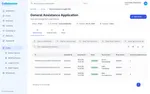
Review before a record exists
- Applications land in a review queue. Staff accept, waitlist or decline, with a reason such as not eligible or insufficient information.
- Acceptance creates the case. Declined applicants never become client records.
- The patient, caregivers and family sit on one case, each in their own role.
Fundraising and reimbursements
- Record donations, with fees and net amounts calculated for you, not in a spreadsheet.
- Pull donations from Classy on a schedule.
- Each case shows its balance and approved reimbursements by category.
- Create a Bill.com bill from an approved reimbursement.
Reports
- Export any form to CSV or JSON.
- Ask the reporting agent, the AI assistant that runs your funder reports, how much was approved by assistance type this year. Collaborate computes the numbers, not the agent.
“Without many of the reports created for us in Collaborate, we couldn’t have been able to apply for several new grants.”
 Jennifer PuthoffProgram Manager, Santa Clara County Children's Advocacy Center
Network Ninja is HIPAA compliant and audited annually for both HIPAA and SOC 2 Type 2.
See it configured for your programs.
Bring your forms and your funder list, and we will show you how they fit.